

Are you tired of every single MMO you play having ugly headgear? Well, I’ve got good news for you! In New World Aeternum, you can hide headgear and it doesn’t cost anything. Here is a quick guide on how to hide your headgear/headpiece/head slot, whatever you want to call it, in New World.
Go to your Inventory, then right-click on the Headgear Slot then click on ‘Change Skin’, then click ‘Hide Headgear’.
Inventory -> Headgear Slot -> Change Skin -> Heavy Headwear -> Hide Headgear (Crossed out Eye Icon)

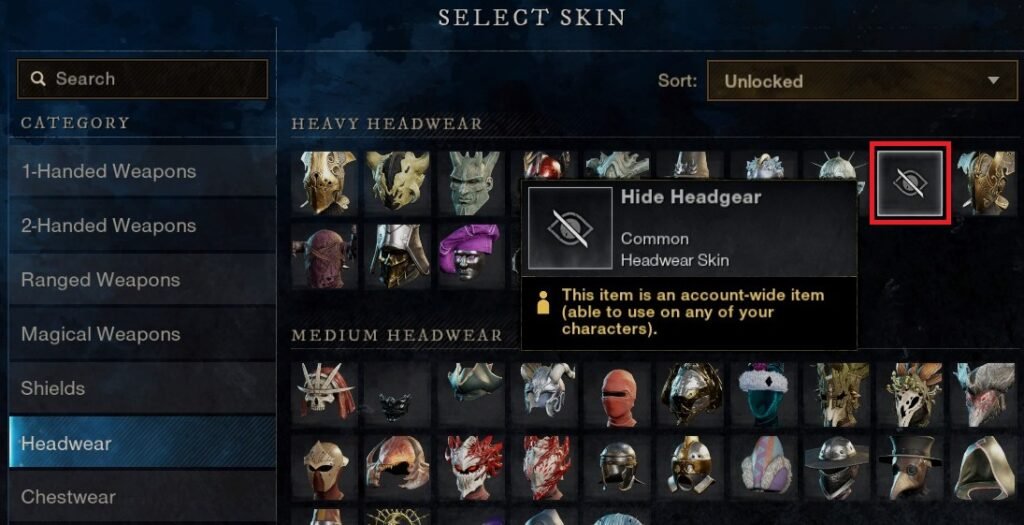
Now that ugly headpiece you just picked up is now safely hidden on your character never to be seen again (until you put ona new headpiece).
There is also the option to hide all the other armour slots too. Follow the same steps above for each armor slot. You can learn more about Transmog in my Transmog Guide.
Thanks for checking out my guide!
Discover more from Xam Xam
Subscribe to get the latest posts sent to your email.


