

Here is an in-depth guide to the newly released Transmog system in New World Aeternum. This guide covers everything you need to know about the Stylemancer, Transmogging and dyeing Skins. The Transmog system was introduced part way through Season 2.
New World Aeternum Transmog Overview
New World Aeternums Transmog systems allows you to turn any item earned in game into a Skin using Transmog Tokens and to dye Skins. Skins that are bought from the shop are also dyeable. Use Transmog Tokens at the Stylemancer NPC to turn collected gear pieces into Skins.
When you apply a Skin to a piece of gear, it remains on that gear piece even if you unequip it or swap to another gear set. This means you can can effectively have different looks for different sets.
Accessing the Stylemancer
You can access the Stylemancer by going to any major settlement and talking to the Stylemancer NPC next to the Outfitter Crafting Station. They will have Transmog token symbol above them (as pictured below).

Stylemancer UI Overview
You use the Stylemancer NPC to transmog collected gear looks into Skins using Transmog Tokens.
The Stylemancer UI shows you all possible Skins you can earn in the game and from the store. Collected Skins are highlighted and skins that can be Transmogged have a Transmog Symbol in the bottom right corner. Skins purchased via the Store will have a Store symbol in the bottom right corner. Skins earned through Twitch Drops or Prime Gaming will have a Twitch or Prime Gaming Symbol in the bottom right corner.
Skins are sorted in categories for different weapon ad gear types. You can sort each category by “Unlocked”, “Collected”, Source – Store” and “Name”.

How to Transmog Gear Pieces
All you have to do is click on the Skin you want to Transmog in the Stylemancer UI (accessed via Stylemancer NPC in Settlements), then click Transmog.
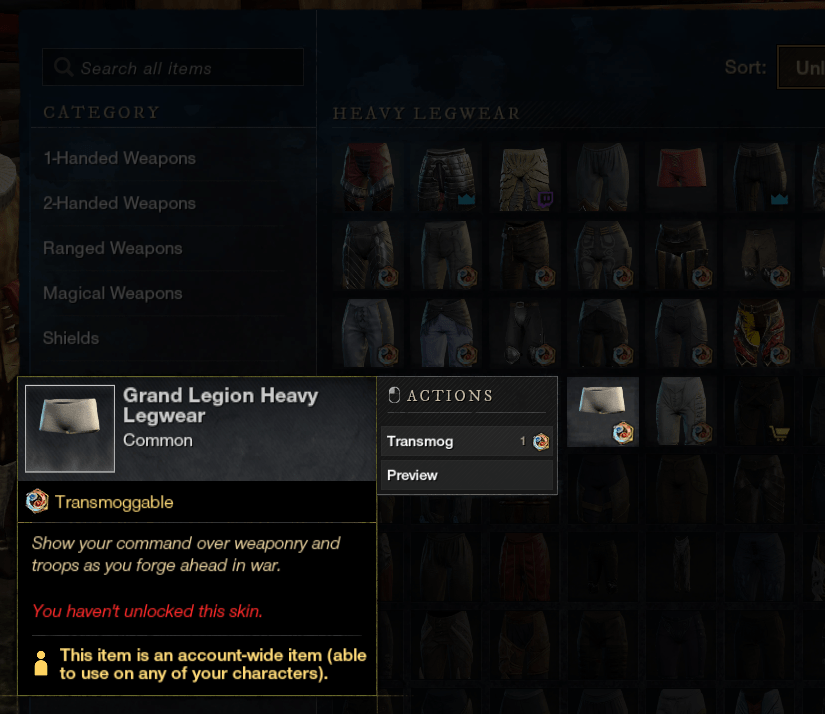
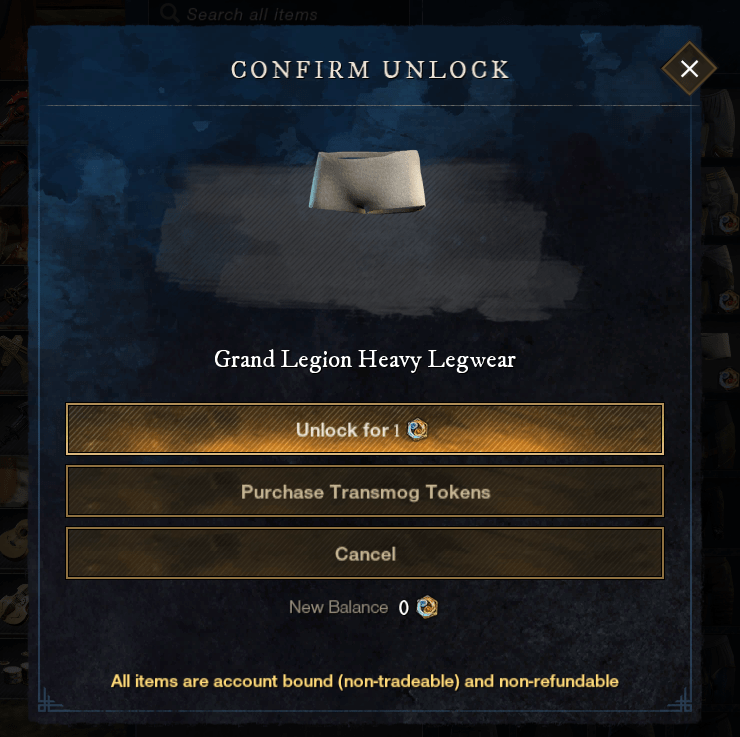
You can then click on the option to unlock it and spend 1 Transmog Token or purchase Transmog Tokens if you don’t have any. Note there is no confirmation dialogue. Once you click unlock, it unlocks the Skin for Transmog.
How to Apply Skins in New World Aeternum
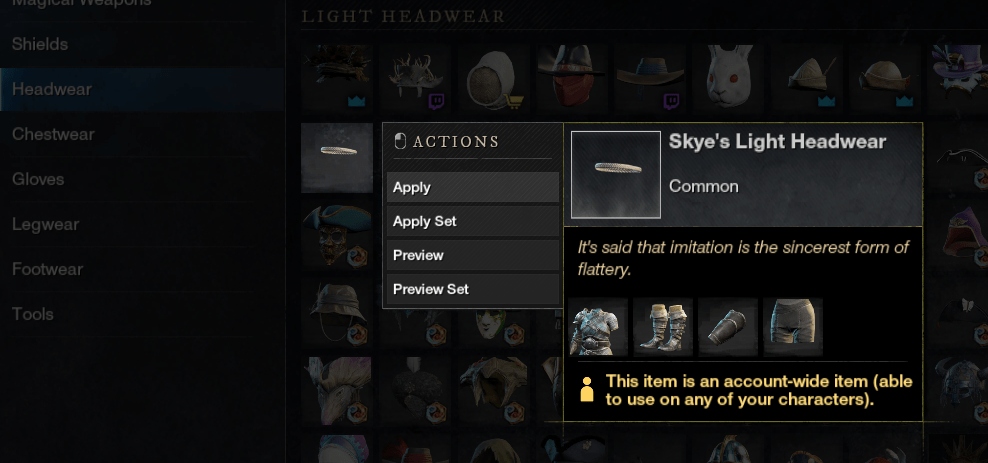
You can apply Skins to your gear via the Stylemancer or your Inventory. If you’re in the Stylemancer, simply click on the Skin you want to apply then click Apply.
How to Dye Armor and Skins in New World Aeternum
While in the Stylemancer or your Inventory, simply click on the Skin you want to Dye then select ‘Dye Item’. This will bring up the ‘Dye Armour and Skins’ UI. From here you can select different dyes in different slots. Dye is only applied to the Skin/s if you hit Confirm. Clicking Cancel will cancel out you current session. You can also remove dye from a Skin.

Clicking on a dye slot will show all dyes. You can sort dyes into different categories; ‘Show Available Only’, “Available and Purchasable” and “Show All”.

A couple of things to note.
- Unfortunately, you cannot dye weapons.
- You cannot easily preview dyes that you do not own, sometimes hovering over the dye will preview it.
- Crafted dyes need to be in your Inventory or in the Storage of the town you’re in to be able to see/apply them.
Where to find Dyes
Dye can be sourced from the following places.
- Crafting (Kitchen)
- Store (Cash Shop)
- Faction Reputation Vendors
- PvP Track
How to Craft Dyes
You can craft Dyes at the Kitchen Crafting Station. Dyes are crafted using Water and Pigments.

Pigments are harvested from Prismablooms which can be found in across all zones in the game. Different colours are found in different zones.


Prismabloom Table
Here is a table showing where you can get Pigments from. For a map of Prismabloom locations check out Aeternum Map.
| Primablooms | Zone/s | Pigment/s |
|---|---|---|
| Black | Brightwood | Black |
| Blue | Restless Shore | Blue |
| Brown | Weaver’s Fen | Brown |
| Cyan | Edengrove & Reekwater | Cyan |
| Desert Rose | Brimstone Sands | Cyan, Green & Red |
| Green | Monarch’s Bluffs | Green |
| Magenta | Elysian Wilds | Magenta |
| Orange | Everfall | Orange |
| Red | Shattered Mountain | Red |
| Turquoise | Windsward | Turquoise |
| Violet | Ebonscale Reach | Purple |
| White | Great Cleave | White |
| Yellow | Cutlass Keys & Mourningdale | Yellow |
How to Acquire Transmog Tokens
You can acquire Transmog Tokens from the following places. You can no longer acquire them from Elite Chests.
- In-Game Store
- Season Pass Rewards
In-Game Store (Cash Shop) Transmog Token Costs
- 1 Transmog Token for 2,500 Marks of Fortune
- 2 Transmog Tokens for 5,000 Marks of Fortune
- 5 Transmog Tokens for 10,000 Marks of Fortune
- 10 Transmog Tokens for 20,000 Marks of Fortune
Searching for Skins You Don’t Own
While a handful of Skins in the Stylemancer have a more detailed tooltip that tells you where the Skin comes from, the majority do not. The best place to search for Skins you don’t own and where they come from is New World Database.
Simply type the name of the Skin and the search dropdown will populate with the name of the item that uses that Skin. When you click on it, scroll down and click on the ‘Transmog’, ‘Contained’ or ‘Dropped by’ Tabs to learn more about where the item comes from.
Keep in mind that most Expedition skins can be crafted.
My Transmogs
Here are some of my Transmogs if you’re looking for inspiration or are curious.


Thanks for reading my guide! Do you have any favourite Skins? How many outfits have you created?
Discover more from Xam Xam
Subscribe to get the latest posts sent to your email.


